Find your beltpack
Every beltpack has a unique ID number in the center of the top of the screen. The crew position assigned to that beltpack is in the upper left corner of the display. Take your beltpack from the charger.

Power up the beltpack.
Press the square red power key on the bottom of the beltpack firmly for three or four seconds. You do not have to press hard, just longer than you would expect. Your patience will be rewarded by a vibrating sensation.
Find your headset
Beltpacks should already be paired with a bluetooth headset. The headsets and chargers are labeled to correspond to the beltpack they are paired to. Find the headset with the same number as your beltpack.
Power up the headset.
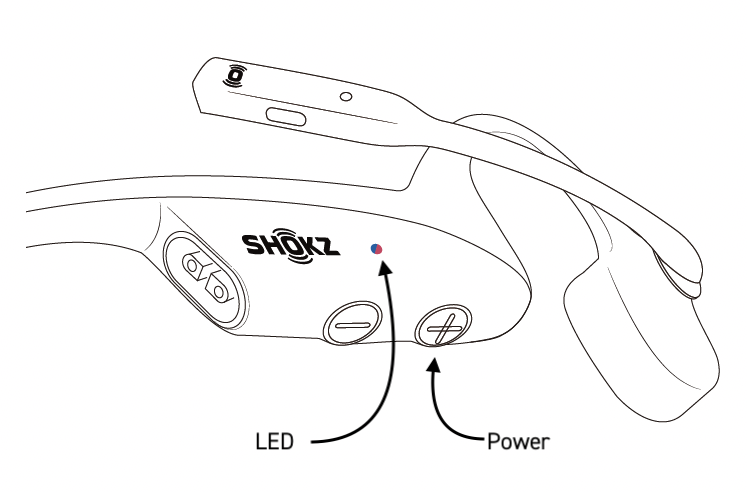
For Shokz OpenCom headsets, press the + button for about two seconds until the LED glows blue. To power off, press and hold the + again, until the LED glows red.
Confirm Headset Connection
Check the status bar at the top of the beltpack display.

There are three possibilities for what you will see in this space.
| Symbol | Meaning | Action |
|---|---|---|
 | Paired - Connected | You’re good to go. |
 | Paired - Not Connected | Confirm headset is powered on. If it is on and not connected, see 04 Pair Your Bluetooth Headset. |
 | No Bluetooth Paired | See 04 Pair Your Bluetooth Headset. |
Headset Battery
Shokz headset batteries last for about eight hours, so, you should make sure your headset gets charged at lunch.
If you hear a woman telling you your headset battery has run low…
…putting a Shokz headset on charge for as little as five minutes will give two more hours of run time.
There are also spare headsets available. Connect the replacement headset following these instructions: 04 Pair Your Bluetooth Headset.